In focus: IDEXX Diagnostics

Accurate diagnostics are at the heart of quality veterinary care. With your IDEXX diagnostic equipment seamlessly integrated into Animana, test results flow directly into the patient record. This saves time, reduces errors, and ensures that your team has all the information they need to provide the best care possible.

This is box title
There is a new and improved way to order your IDEXX in-house tests. Please find more information on the new workflow below.

Frequently asked questions

What's changing, and does it affect me?
We are retiring the current method by which Animana integrates with IDEXX in-house tests. If you use Animana to order tests on your internal IDEXX diagnostic equipment, the current screens in Animana will be updated to utilise the VetConnect PLUS interface, which communicates directly with your IDEXX VetLab Station.
Why is it changing?
The current implementation relies on the “WebAgent”, which is the source of much frustration. The new system utilises our robust VetConnect PLUS ordering system, which enhances stability, as well as leveraging the latest technologies built into the VetConnect PLUS system.

With this change, your practice can look forward to:

  • Greater robustness and ease of use
  • A single, unified interface for both IDEXX In-house diagnostics and IDEXX Reference Laboratories
  • Access to the latest VetConnect PLUS technology, including advanced features like trending
  • Enhanced support for automated billing and accurate charge capture
What does it look like?
Here is a sneak preview of the new workflow to order an IDEXX in-house test from Animana:
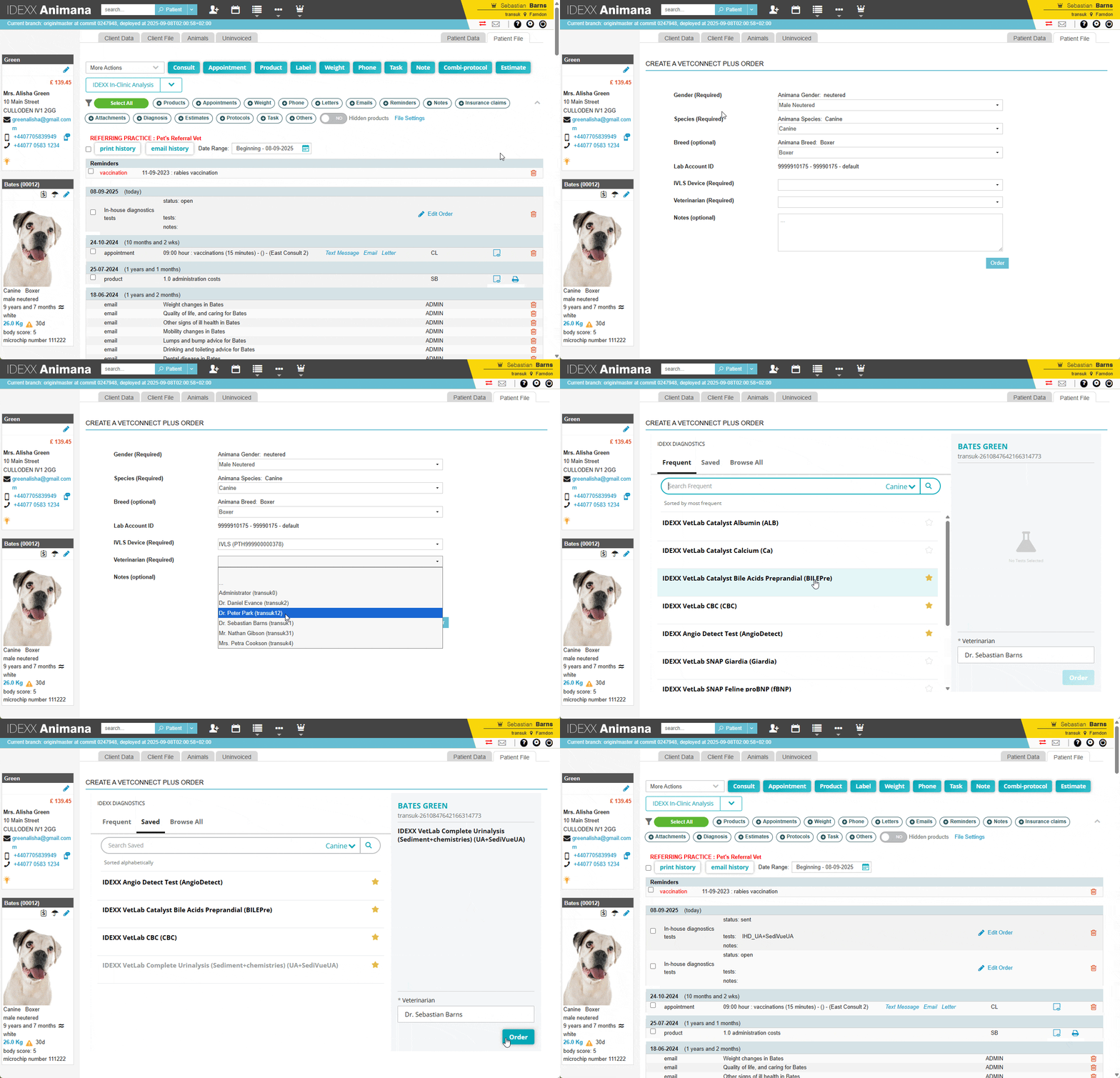
You can shortlist or favourite the tests available in your practice, by clicking the star behind it – making it gold (as you can see in the video above). The starred tests will then be available in the tab Saved for easy access.

When is this change coming?
The new workflow is already available to all customers.

How do I enable the new integration?
Read and follow the instructions in this article to enable the new integration:

How do I setup the connection between Animana and IDEXX VetLab Station?

After you’ve completed step 5, click on the button below to request activation via our request form:

What happens if I don't migrate to the new system?
The current integration will be retired, and we encourage you to migrate straight away to ensure uninterrupted service. By moving now, your practice will benefit from a single, modern platform with easier workflows and automated billing support.
I have multiple locations, is there anything I need to keep in mind?

Yes, a few things are different for multi-location practices, especially when you want to be able to request tests from different locations:

  • Your locations need to be linked in VetConnect Plus You’ll need to give written permission to the IDEXX reference lab team for all your practice’s SAP/LIMS IDs to be linked together before the accounts can be connected (MLSD setup).
  • Remove old IVLS credentials before linking. If you use in-house analysers, the VetConnect Plus login must be removed from every IDEXX VetLab Station (IVLS) at every location before linking, doing this afterwards can cause results to be routed to the wrong location.
  • You’ll use one parent login. Once linked, you’ll enter a single parent VetConnect Plus login in Animana and map each of your locations to its LIMS ID and IVLS in Animana.
  • Multiple machines still need separate Vetconnect Plus integration member credentials. If a location has more than one IVLS, each machine needs its own integration credentials so test requests and results reach the right device. Your IDEXX reference lab team can set this up for you
  • Give it time to sync. Allow up to 24 hours for a newly linked IVLS to appear in Animana.

Not sure whether your setup counts as multi-location, or need the linking permission arranged? Your IDEXX reference lab team can confirm this with you.

Is it possible to use different IVLS devices in 1 Animana location?

Yes, with this new integration it’s possible to link multiple IVLS devices to 1 Animana location, but this does require additional setup. Especially when you want to be able to request tests from different locations:

  • Multiple machines still need separate Vetconnect Plus integration member credentials. If a location has more than one IVLS, each machine needs its own integration credentials so test requests and results reach the right device. Your IDEXX reference lab team can set this up for you
  • Give it time to sync. Allow up to 24 hours for a newly linked IVLS to appear in Animana.

Not sure whether your setup counts as multi-device, or need additional integration credentials? Your IDEXX reference lab team can confirm this with you.

Is it possible to use 1 IVLS device with multiple Animana accounts?

Yes, with this new integration it is possible to link 1 IVLS device to multiple Animana accounts, but this does require some additional settings:

  • The locations must be linked to each other in VetConnect Plus. You must give written permission to the IDEXX Reference Laboratories team to link all the SAP/LIMS numbers of the practices together before the accounts can be connected (MLSD setup).
  • You will use one main account. Once the link has been made, you enter one main VetConnect Plus login in both Animana accounts and link each account to the corresponding LIMS number and the IVLS in Animana.
  • Multiple devices still need separate login credentials. If a location has more than one IVLS, each device needs its own integration login credentials so that test requests and results end up at the correct device. Your IDEXX Reference Laboratories team can set this up for you.
  • Give it time to synchronize. It can take up to 24 hours before a newly linked IVLS is visible in Animana.

Please note: With this setup, you will receive all test results in both Animana accounts. The test results you requested from the account are automatically linked to the correct patient. The test results requested from the other Animana account will remain in the worklist as unlinked results until you delete them.

Prefer not to set up the multi-account link? You can connect your IVLS to the Animana account that uses it most, and run tests for your other accounts directly from the device as you do today. For those tests, export the results as a PDF (or send them by email) and attach them to the patient record in your Animana account manually.


Help articles


Other resources

Blogs

How to run your practice as smoothly as a Rolodex

Read more
Sample, click and go – experience the ease of seamless integration

Read more

Need more help?

We’re sorry you couldn’t find the answer you’re looking for. We recommend you contact our Customer Support team.

Updated on 2 October 2026
Was this article helpful?